Stay Lithe.
Remember URLs.
A context-aware sidebar for pinning notes, voice memos, and snapshots directly to the web pages you visit.
Add to Chrome — It's Free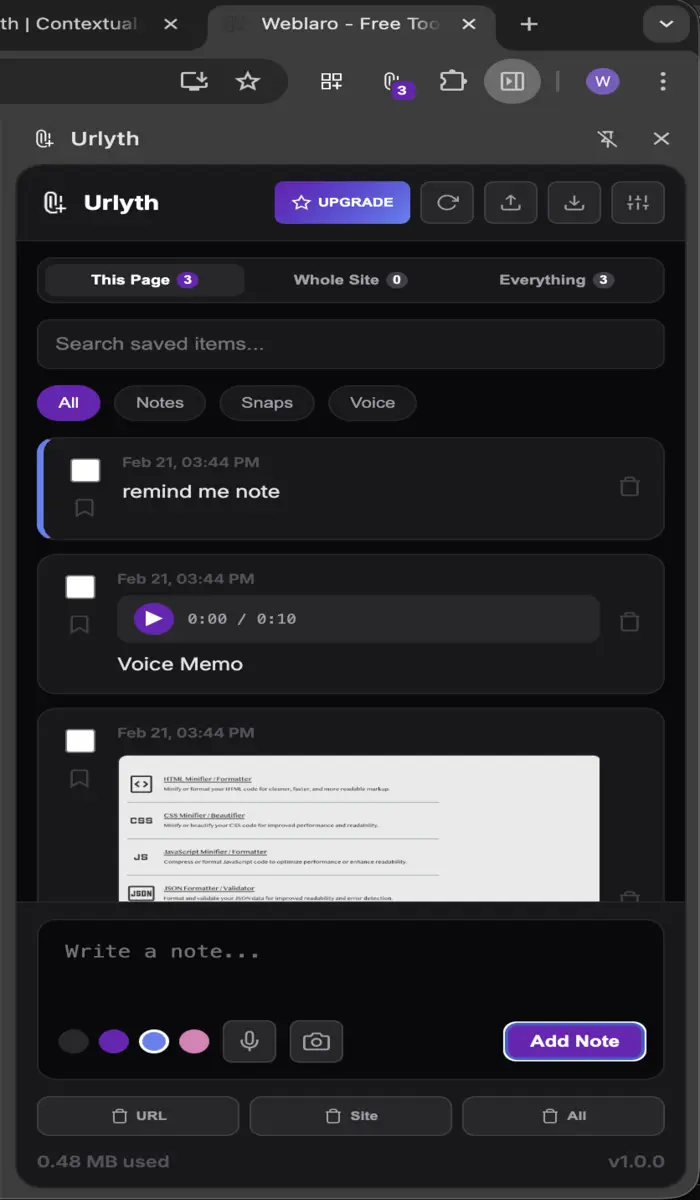
A context-aware sidebar for pinning notes, voice memos, and snapshots directly to the web pages you visit.
Add to Chrome — It's Free
Notes are automatically filtered by the current URL or site you're browsing. Your thoughts stay where they belong.
Record audio thoughts instantly. Perfect for capturing context without stopping to type.
Visual bookmarks. Take a screenshot of the current tab and pin it alongside your text notes.
Urlyth offers three views: "This Page" (specific URL), "Whole Site" (current domain), and "Everything" (all stored notes).
Click the Mic icon to record. Note that you must grant microphone permission via the "Mic Gate" before your first recording.
The free version is limited by item count (15 notes, 10 snaps, 5 audio). You will be prompted to upgrade to Lifetime for unlimited access.
Use the Export/Import buttons in the header to save your database as a .json file. This ensures your data is portable and safe.
You can delete individual notes or use the bulk action buttons (URL, Site, All) to clear entire segments of data.
Yes. Urlyth is serverless. All data is stored locally in your browser and never leaves your machine.